Understanding Image to Prompt Generators
In the realm of artificial intelligence and digital creativity, image to prompt generators are emerging as powerful tools that facilitate the conversion of visual elements into articulate text descriptions. With the rapid growth of AI-driven art platforms, the demand for such technology has surged, enabling users to generate prompts tailored for various AI image generators seamlessly. For enthusiasts and professionals alike, using an image to prompt generator can enhance productivity and creativity, providing a bridge between stunning visuals and text-based creativity.
What is an Image to Prompt Generator?
An image to prompt generator is an advanced AI tool designed to analyze and interpret visual content, converting it into detailed, structured text prompts. These prompts serve as instructions for AI image generation, allowing users to leverage the power of AI art models effectively. By dissecting elements such as subjects, environments, lighting, and overall mood, an image to prompt generator creates descriptions that encapsulate the essence of the original image.
The Technology Behind AI Image Processing
The backbone of image to prompt generators lies in sophisticated computer vision algorithms and large language models. These technologies work in tandem to interpret the content of images accurately. The process begins with the AI visually analyzing an image to identify key features, including colors, shapes, textures, and forms. Once these elements are recognized, the system uses a language model to translate them into coherent, natural-language prompts. This dual-layered approach ensures that the generated prompts are both descriptive and contextually relevant, making them suitable for various AI image generators like Midjourney, DALL·E, or Stable Diffusion.
How to Choose the Right AI Model
Choosing the appropriate AI model for your needs involves understanding the strengths and compatibility of the various models available. Different AI generators excel in distinct types of art styles and rendering techniques. For instance, Midjourney is known for its artistic flair, while Stable Diffusion may provide better photorealistic outputs. By familiarizing yourself with each model’s capabilities, you can better select an image to prompt generator that aligns with your creative vision.
How to Use Image to Prompt Generators Effectively
Step-by-Step Guide to Generating Prompts
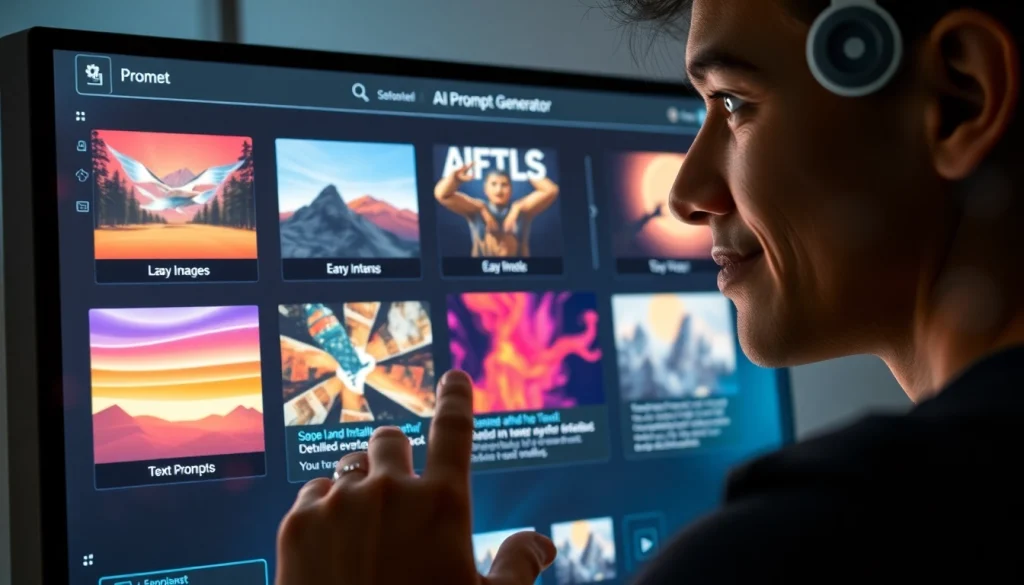
Using an image to prompt generator effectively involves a straightforward yet methodical approach. Here’s a step-by-step guide:
- Upload or select the image you want to analyze.
- Click the “Generate Prompt” button to initiate the process.
- Wait for a few seconds as the AI processes your image and formulates a prompt.
- Review the generated prompt, and if desired, refine it further to suit your creative needs.
- Copy the final prompt to use in your preferred AI image generator.
Common User Mistakes and How to Avoid Them
While using image to prompt generators is relatively simple, users can make common mistakes that hinder their results. Here are a few pitfalls to avoid:
- Overlooking Image Quality: Ensure that the uploaded images are clear and of high resolution to facilitate accurate analysis.
- Ignoring AI Model Compatibility: Not all generated prompts are suited for every AI model. Tailor your prompts based on the specific capabilities of the AI you intend to use.
- Refining Prompts Inadequately: Take the time to modify and enhance the generated prompts to better fit your vision. This can significantly improve the output quality of the AI-generated images.
Refining Your Prompts for Better AI Results
Prompt refinement is a critical step in achieving high-quality AI-generated images. After the initial generation, consider the following tips:
- Focus on specific attributes you want to emphasize, such as mood, color palette, or stylistic elements.
- Use more descriptive adjectives and nouns to convey your vision more precisely.
- Experiment with different structures and formats to find what generates the best results with your chosen AI model.
Benefits of Using an Image to Prompt Generator
Enhancing Creativity with AI Assistance
One of the most significant advantages of using an image to prompt generator is the boost in creativity it provides. By transforming visuals into text, users can explore new artistic directions and push their creative boundaries. The generator acts as a collaborator, helping artists visualize ideas that they might not have articulated otherwise.
Time Efficiency in Generating Ideas
For many creatives, ideation can be time-consuming. An image to prompt generator streamlines this process, significantly reducing the time spent brainstorming. Users can upload an image and receive a detailed prompt within seconds, allowing them to quickly move from concept to execution.
Improving Quality of AI Images Generated
Quality is paramount in digital art creation. By utilizing precise and well-structured prompts, users can greatly enhance the quality of the images produced. Image to prompt generators are designed to provide detailed descriptions that optimize results in various AI art tools, ultimately leading to more satisfying outcomes.
Exploring Compatibility with Different AI Tools
Using Image to Prompt with Nano Banana Pro
The Image to Prompt Generator is fully compatible with Nano Banana Pro, ensuring that prompts are tailored specifically for this high-performance model. This compatibility allows users to generate hyper-detailed prompts that leverage Nano Banana Pro’s advanced capabilities, paving the way for stunning results.
Optimizing for Midjourney and Stable Diffusion
When working with Midjourney or Stable Diffusion, using an image to prompt generator can drastically improve the output. Each model has unique features and strengths; thus, creating prompts that highlight those characteristics can lead to more dynamic and visually striking artwork. The Image to Prompt Generator aids users in formulating prompts that resonate with the specifics of these platforms.
Benefits of Integration with Google’s Gemini
Google’s Gemini is rapidly gaining attention for its innovative image generation capabilities. Using an image to prompt generator, artists can optimize their prompts to align with Gemini’s unique style and preferences, ensuring that the generated outputs are not only cohesive but also reflective of their artistic vision.
Future Trends in AI-Driven Image Generation
Emerging Technologies in Image Analysis
The future of image analysis in AI technology looks promising. With advancements in machine learning and neural networks, we can expect image to prompt generators to become even more sophisticated, understanding complex visual narratives and producing prompts with remarkable accuracy and detail.
Predictions for AI Art Evolution by 2026
As AI continues to evolve, the art it generates will also advance in complexity and style. By 2026, we might see AI generating artwork that closely mimics human creativity, incorporating elements like emotional depth and cultural relevance, all guided by nuanced and finely-tuned prompts produced by advanced image to prompt generators.
Ethical Considerations in AI-Generated Content
With the rapid advancement of AI-generated art, ethical considerations have become increasingly important. Issues around copyright, originality, and the role of human creativity in art are at the forefront of discussions. As image to prompt generators become commonplace, ensuring that the generated content respects these ethical boundaries will be crucial for the future of digital art.